ECS Deploy Runner: How to update the regex that guards against unauthorized repositories
A customer asked: > I'm encountering the following error when attempting to run a plan or apply job through Gruntwork Pipelines: ``` ERROR: OptionRegexRestrictedError: Provided value for option repo (<repo>) does not match regex (regex). ```
## Overview The Gruntwork Reference Architecture version 2.0 and above comes with Pipelines configured for use. In the following diagram, the box labeled `Deployment Lambda Function` refers to a Lambda that ensures only pre-authorized repositories are being used as inputs to Terraform plan and apply jobs in your CI/CD pipeline. 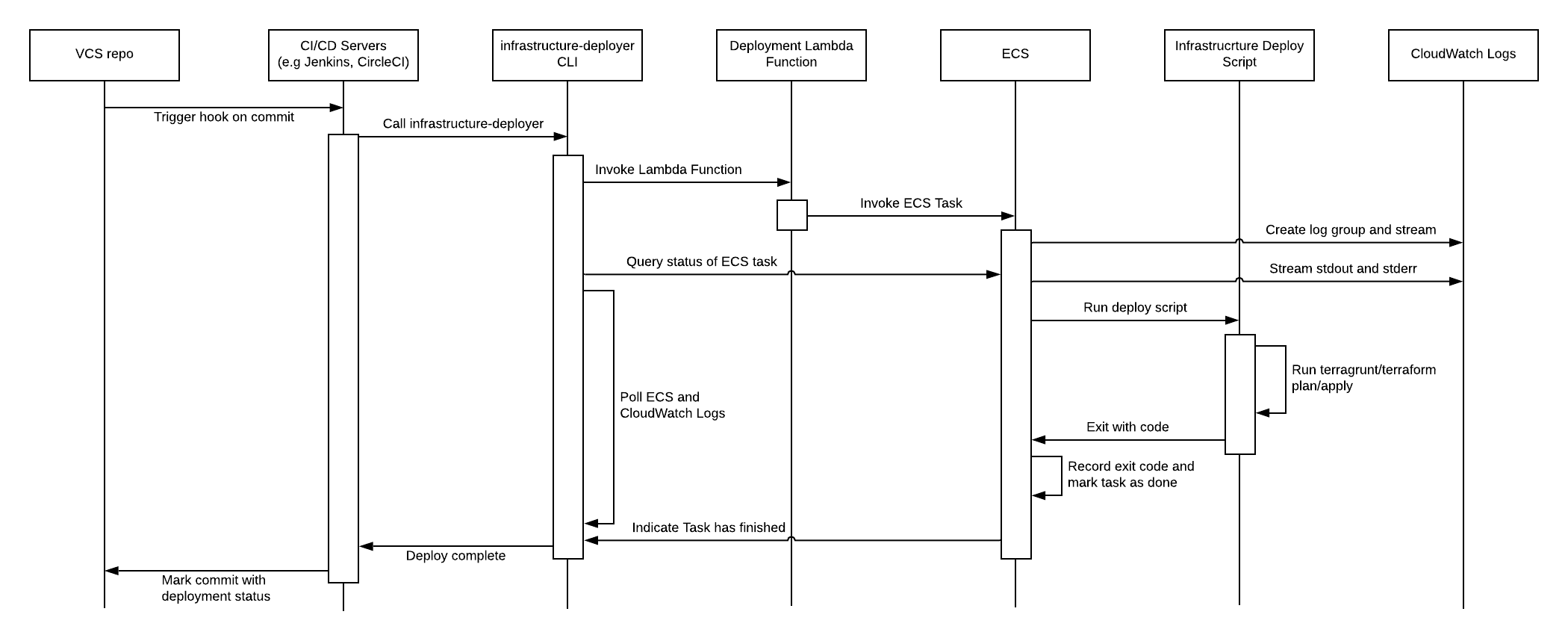 This Lambda function determines which repositories are allowed as sources by way of a Regular Expression that can be optionally passed into the Lambda when deploying Pipelines. To learn more about the security mitigations that Pipelines implements, [see this guide](https://docs.gruntwork.io/guides/build-it-yourself/pipelines/production-grade-design/summary-of-mitigations). Occasionally, depending on your current and intended VCS hosting platform for your infrastructure-live repository, you may find it necessary to update this regex in order to allow new repositories to function as authorized sources for your CI/CD pipeline. ## Finding the configuration The configuration that determines which repositories are allowed to initiate ECS Deploy Runner plan or apply jobs is managed [here](https://github.com/gruntwork-io/terraform-aws-service-catalog/blob/master/examples/for-production/infrastructure-live/_envcommon/mgmt/ecs-deploy-runner.hcl), in the ECS Deploy Runner configuration under `_envcommon`. Specifically, there are two inputs to the `ecs-deploy-runner.hcl` file to be aware of when attempting to modify which repositories the ECS Deploy Runner is authorized to operate on: * [`infrastructure_live_repositories`](https://github.com/gruntwork-io/terraform-aws-service-catalog/blob/master/examples/for-production/infrastructure-live/_envcommon/mgmt/ecs-deploy-runner.hcl#L146) * [`infrastructure_live_repositories_regex`](https://github.com/gruntwork-io/terraform-aws-service-catalog/blob/master/examples/for-production/infrastructure-live/_envcommon/mgmt/ecs-deploy-runner.hcl#L147) These inputs correspond to the service catalog's ecs-deploy-runner module's variables: [`terraform_planner_config`](https://github.com/gruntwork-io/terraform-aws-service-catalog/blob/443161f292/modules/mgmt/ecs-deploy-runner/variables.tf#L170) * [`infrastructure_live_repositories`](https://github.com/gruntwork-io/terraform-aws-service-catalog/blob/443161f292/modules/mgmt/ecs-deploy-runner/variables.tf#L207) * [`infrastructure_live_repositories_regex`](https://github.com/gruntwork-io/terraform-aws-service-catalog/blob/443161f292/modules/mgmt/ecs-deploy-runner/variables.tf#L213) and [`terraform_applier_config`](https://github.com/gruntwork-io/terraform-aws-service-catalog/blob/443161f292/modules/mgmt/ecs-deploy-runner/variables.tf#L248) * [`infrastructure_live_repositories`](https://github.com/gruntwork-io/terraform-aws-service-catalog/blob/443161f292/modules/mgmt/ecs-deploy-runner/variables.tf#L285) * [`infrastructure_live_repositories_regex`](https://github.com/gruntwork-io/terraform-aws-service-catalog/blob/443161f292/modules/mgmt/ecs-deploy-runner/variables.tf#L291) These variables in turn are fed into the service catalog's ECS Deploy Runner module's `standard_config` module, which sets up the ECS Deploy Runner's configuration: * [`terraform_planner`](https://github.com/gruntwork-io/terraform-aws-service-catalog/blob/443161f2922c5376183777686fdf18e712e634e6/modules/mgmt/ecs-deploy-runner/main.tf#L158-L159) * [`terraform_applier`](https://github.com/gruntwork-io/terraform-aws-service-catalog/blob/443161f2922c5376183777686fdf18e712e634e6/modules/mgmt/ecs-deploy-runner/main.tf#L213-L214) Within the [`terraform-aws-ci`'s `ecs-deploy-runner-standard-configuration` module](), these inputs are then [combined here](https://github.com/gruntwork-io/terraform-aws-ci/blob/5f2b4e46b7a7b122b70cc7adc6933cfd2429f3f4/modules/ecs-deploy-runner-standard-configuration/main.tf#L198-L393) into one single merged regex twice. - Once for the terraform plan job's configuration and lambda regex [here](https://github.com/gruntwork-io/terraform-aws-ci/blob/5f2b4e46b7a7b122b70cc7adc6933cfd2429f3f4/modules/ecs-deploy-runner-standard-configuration/main.tf#L198-L291), - and once for the terraform apply job's configuration and lambda regex [here](https://github.com/gruntwork-io/terraform-aws-ci/blob/5f2b4e46b7a7b122b70cc7adc6933cfd2429f3f4/modules/ecs-deploy-runner-standard-configuration/main.tf#L293-L393) Therefore, if you wanted to add a regex, which all repositories that match will be allowed as a source for a Terragrunt plan job, you would do so [here](https://github.com/gruntwork-io/terraform-aws-service-catalog/blob/443161f2922c5376183777686fdf18e712e634e6/examples/for-production/infrastructure-live/_envcommon/mgmt/ecs-deploy-runner.hcl#L147), in the `terraform_planner_config's` `infrastructure_live_repositories_regex` list. Likewise, if you wanted to add a regex, which all repositories that match will be allowed as a source for a Terragrunt apply job, you would do so [here](https://github.com/gruntwork-io/terraform-aws-service-catalog/blob/443161f2922c5376183777686fdf18e712e634e6/examples/for-production/infrastructure-live/_envcommon/mgmt/ecs-deploy-runner.hcl#L165) in the `terraform_applier_config's` `infrastructure_live_repositories_regex` list. With those changes in place, either running a `terragrunt plan` when authenticated to any child environment in your infrastructure-live will result in a similar update to the following: ``` Terraform used the selected providers to generate the following execution plan. Resource actions are indicated with the following symbols: ~ update in-place Terraform will perform the following actions: # module.ecs_deploy_runner.module.deploy_runner_invoker_lambda.aws_lambda_function.function[0] will be updated in-place ~ resource "aws_lambda_function" "function" { id = "ecs-deploy-runner-invoker" ~ last_modified = "2022-03-31T14:19:30.000+0000" -> (known after apply) ~ source_code_hash = "OFt3Jd0Eb6Ii+XGS23s98+rPc=" -> "E5IInM2OFEjQoaImSF51FogZzdY+bQYCCs=" tags = {} # (19 unchanged attributes hidden) ``` The reason we expect to see the deploy runner invoker lambda's `source_code_hash` planned to be updated in place, is that this lamdba function is a component of the ECS Deploy Runner system, which guards against unauthorized or malicious CI/CD runs by using its regex, which we've now just re-configured, to reject any requests associated with unauthorized repositories. *N.B*: there is an ECS Deploy Runner in each of your accounts, so be sure to run `terragrunt apply` in your local `ecs-deploy-runner` folder, for every account in your Reference Architecture. Be sure to authenticate to the correct account when applying your changes. ## How do I view the source code of the Lambda being used to guard against unauthorized repositories? Log into one of the accounts in your Ref Arch and visit the Lambda UI. Ensure you are viewing the correct Primary Region in AWS where you requested that your Ref Arch be deployed. Find the Lambda named `ecs-deploy-runner-invoker-lambda`, then click Configuration -> Environment variables in the UI. Find the Environment variable named `BASE64GZ_CONFIG_DATA_JSON` and copy its entire value to your clipboard. Next, run the following command. Note that you will first need the following tools installed on your system: * base64 * gzip * jq * `echo "<the contents of BASE64GZ_CONFIG_DATA_JSON that you copied>" | base64 --decode | gzip -d | jq`